Blog
SQL Server Error Code – 33182 the command must be executed on the targ

In this blog post, you’ll learn more about the SQL Server Error Code 33182 and the error message description that is shown SQL Server Error Code 33182 SQL Server Error Description for the Code :33182 The command must be executed on the target database ‘%.*ls’.
SQL Server Error Code – 21326 could not find the dynamic snapshot job
In this blog post, you’ll learn more about the SQL Server Error Code 21326 and the error message description that is shown SQL Server Error Code 21326 SQL Server Error Description for the Code :21326 Could not find the dynamic snapshot job with a ‘%ls’ of ‘%ls’ for the specified publication.
SQL Server Error Code – 18802 cannot insert a new schema change into t
In this blog post, you’ll learn more about the SQL Server Error Code 18802 and the error message description that is shown SQL Server Error Code 18802 SQL Server Error Description for the Code :18802 Cannot insert a new schema change into the systranschemas system table. HRESULT = ‘0x%x’. If the problem persists, contact Customer Support Services.
SQL Server Error Code – 9239 internal query notifications error: the
In this blog post, you’ll learn more about the SQL Server Error Code 9239 and the error message description that is shown SQL Server Error Code 9239 SQL Server Error Description for the Code :9239 Internal query notifications error: The garbage collector corrected an inconsistency.
SQL Server Error Code – 6916 xml validation: the content model of typ
In this blog post, you’ll learn more about the SQL Server Error Code 6916 and the error message description that is shown SQL Server Error Code 6916 SQL Server Error Description for the Code :6916 XML Validation: The content model of type or model group ‘%s’ is ambiguous and thus violates the unique particle attribution constraint. Consult SQL Server Books Online for more information.
SQL Server Error Code – 5179 cannot use file ‘%.*ls’, because it is o
In this blog post, you’ll learn more about the SQL Server Error Code 5179 and the error message description that is shown SQL Server Error Code 5179 SQL Server Error Description for the Code :5179 Cannot use file ‘%.*ls’, because it is on a volume with sector size %d. SQL Server supports a maximum sector size of 4096 bytes. Move the file to a volume…
InterSystems IRIS TSQL Code 7391 The operation could not be performed bec
In this post, you’ll learn about the SQL error code 7391 in InterSystems IRIS database the reason why you are receiving the TSQL message when using the InterSystems IRIS data platform Error Code : 7391 Reason for the Error code 7391 in InterSystems IRIS DBMS The operation could not be performed because the OLE DB provider ‘%ls’ was unable to begin a distributed transaction.
InterSystems IRIS TSQL Code 4448 Cannot INSERT into partitioned view ‘%.*
In this post, you’ll learn about the SQL error code 4448 in InterSystems IRIS database the reason why you are receiving the TSQL message when using the InterSystems IRIS data platform Error Code : 4448 Reason for the Error code 4448 in InterSystems IRIS DBMS Cannot INSERT into partitioned view ‘%.*ls’ because values were not supplied for all columns.
Windows System Error Code 15323 – ERROR_GPIO_VERSION_NOT_SUPPORTED (0x3BDB)]
In this post, you’ll learn about the Windows System Error ERROR_GPIO_VERSION_NOT_SUPPORTED (0x3BDB)] and the reason why you are receiving the error message How does this Error in Windows Look like? Error Code 15323 ERROR_GPIO_VERSION_NOT_SUPPORTED (0x3BDB)] Why do you receive the System Error Error Code 15323 ERROR_GPIO_VERSION_NOT_SUPPORTED (0x3BDB)] in Windows? The version specified by the GPIO client driver is not supported.
Win32 COM Error – FVE_E_NO_FEATURE_LICENSE – 0x8031005A
In this post, you’ll learn more about the Error FVE_E_NO_FEATURE_LICENSE – 0x8031005A that is returned when working with the COM-based APIs in Win32 Win32 COM Error FVE_E_NO_FEATURE_LICENSE – 0x8031005A Win32 COM Error Error Description This version of Windows does not support this feature of BitLocker Drive Encryption. To use this feature, upgrade the operating system.
How to fix the Oracle error XOQ-02526: UniqueKey attribute “string” has an invalid populate lineage flag set.?
In this post, you’ll learn more about the Oracle ErrorXOQ-02526: UniqueKey attribute “string” has an invalid populate lineage flag set. with the details on why you receive this error and the possible solution to fix it. Oracle Error Description XOQ-02526: UniqueKey attribute “string” has an invalid populate lineage flag set. Reason for the Error XOQ-02526: UniqueKey attribute “string” has an invalid populate lineage flag set….
Recent Stories
-

AI Reliability Architecture (ReAct, Guardrails, HITL) youtube.com
-

The Future of Software Architecture: Role of an Architect in... youtube.com
-

Stop using Event-Driven Architecture for your CRUD apps youtube.com
-
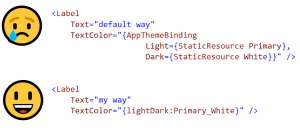
Improve .NET MAUI’s AppThemeBinding? (Matt Lacey) mrlacey.com
-
How to Create 80+ WPF Chart Types (Greg Lutz) developer.mescius.com